
 English
 Русский
 Deutsch
 Français
 Español
 Italiano
 Português
 Türkçe
 Čeština
 한국어
한국어
 中文
中文


The AI generator creates realistic dialogues automatically — just describe the idea. In this guide, we will analyze how to use artificial intelligence to create conversations without manually typing each message.
Describe the dialogue scenario — AI will generate the correspondence in seconds. The result can be edited manually.
Who is it for and for what tasks
Creating viral conversations for Stories, TikTok, and YouTube. Generating funny, dramatic, or touching dialogues.
Demonstrating customer reviews, creating advertising creatives with social proof.
Examples of communication with clients for training managers. Demonstrating the process of selling goods.
Showing examples of work with clients in the portfolio. Visualization of the consultation process.
Pranking friends with fake conversations. Creating memes and jokes for entertainment.
How to Use the AI Generator
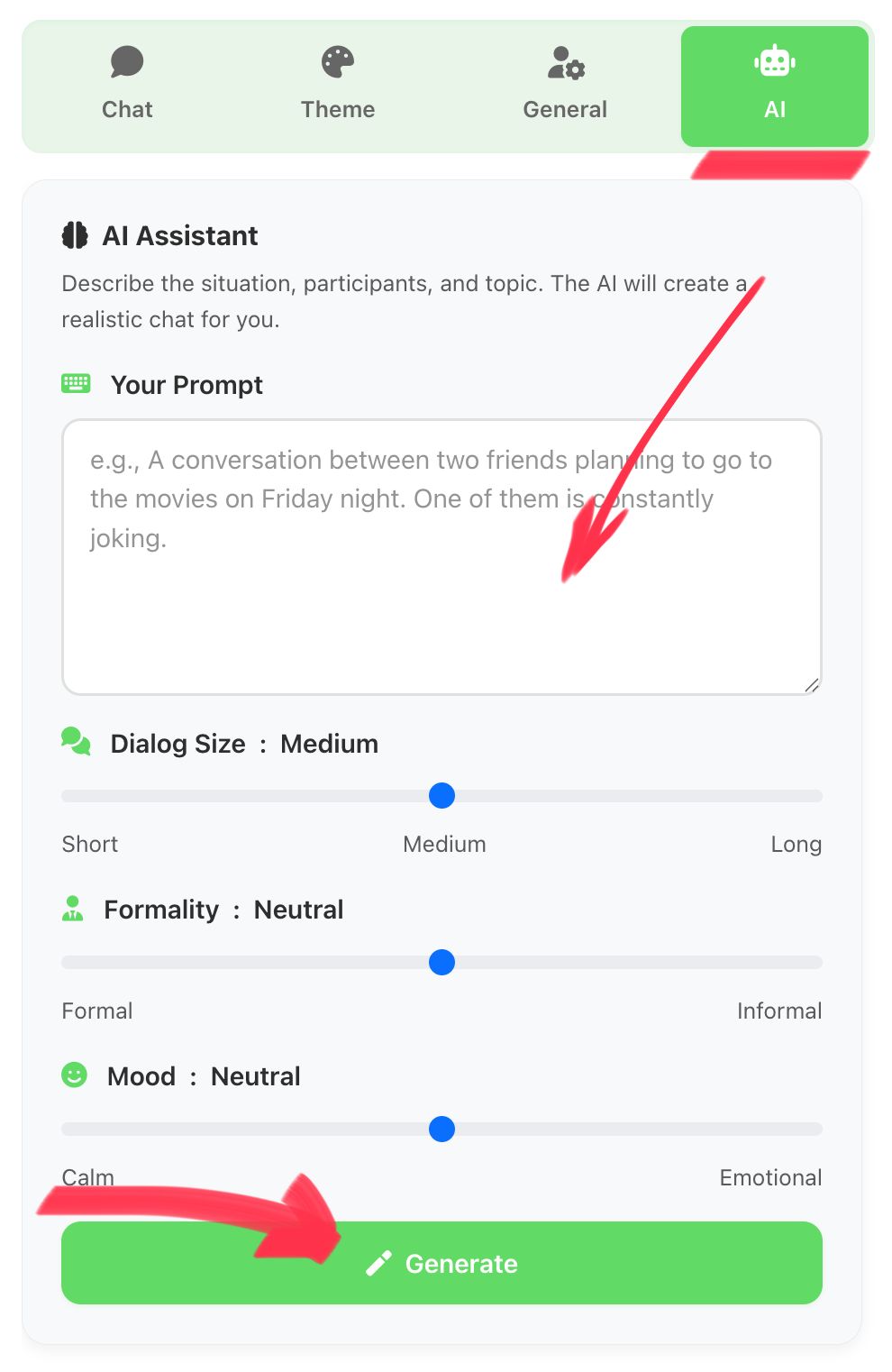
Open the AI Tab
Go to the "AI" tab in the generator to access automatic dialogue creation.
Describe the Scenario
The more detailed the description, the better the result. Specify participants, topic, and emotions of the dialogue.
Step-by-step instructions:
It is located at the top of the generator interface.
In the text field, specify the topic, participants, and character of communication.
Wait a few seconds while the neural network creates the chat.
Review the preview. You can manually change any message.
Usage Scenarios
The AI generator is suitable for a wide range of tasks — from creating content for social networks to demonstrating sales examples. Below are popular scenarios with prompt examples.
Content for Social Networks
For bloggers and SMM specialists
Task: Create an emotional conversation for Stories or posts.
- "Funny conversation between friends about a bad date. 15 messages"
- "Dialogue between friends about a prank. Cheerful tone, 10 messages"
Sales Examples
For entrepreneurs
Task: Show customers the purchase or consultation process.
- "Car dealership manager's correspondence with a client. Bargaining and agreement."
- "Dialogue between a designer and a customer about a logo."
Marketing and Advertising
For marketers
Task: Create creatives, show social proof.
- "Enthusiastic review from a friend about a marketing course."
- "Problem resolution by support service, customer gratitude."
Demonstrating Reviews
For service owners
Task: Show product discussion in private conversations.
- "Colleague recommends a service for automation."
- "Students discuss the quality of an online course."
Tips for Creating Prompts
The quality of the generated correspondence depends on the detail of the description.
What to include in the description:
- Dialogue participants — specify names, roles, and relationships.
- Conversation topic — what the correspondence should be about.
- Tone and emotions — friendly, business, conflict.
- Dialogue length — approximate number of messages.
- Key moments — important details.
"Friendly correspondence between Alex and Mary on Telegram. Alex invites Mary to a birthday party, she agrees. 8-10 messages, light tone"
❌ Too short description
❌ Lack of context
❌ Contradictory requirements
Try the AI Generator Now
Create a realistic chat in seconds.